

Скачать Unknown Device Identifier – неизвестный идентификатор устройства, сканер драйверов, распознавание оборудования
Обзор
The Unknown Device Identifier is a system utility designed to address a common challenge faced by Windows users: unrecognized hardware components. When new devices are connected or the operating system is reinstalled, Windows may fail to identify certain hardware, marking them with a yellow warning symbol in the Device Manager. This app steps in to resolve such issues by scanning the system and identifying these unknown devices. It provides users with detailed information about the unrecognized components, helping them determine the correct drivers needed for full functionality. The target audience includes both casual users and IT professionals who need a reliable tool to troubleshoot hardware compatibility issues without extensive technical knowledge.
Although the developer did not provide additional background information, the app’s purpose is clearly focused on system diagnostics and driver management. Its real-world utility lies in reducing downtime caused by non-functional hardware, such as printers, USB devices, or internal components like audio controllers. In the broader app ecosystem, it fills a niche for lightweight, no-cost solutions that complement built-in Windows tools. The application operates entirely within the Windows environment, offering a streamlined alternative to manual driver searches. With a file size of just 2.1 MB, it is highly efficient and accessible even on older systems.
Ключевые функции и возможности
- Device Recognition: The app performs a comprehensive scan of the system to detect hardware components that Windows fails to identify. It displays detailed information such as device ID, vendor name, and hardware class, enabling users to pinpoint the exact nature of the unrecognized component.
- Driver Search and Download: Once a device is identified, the tool provides links or search suggestions to locate the appropriate driver. This reduces the time and effort required to manually search online databases.
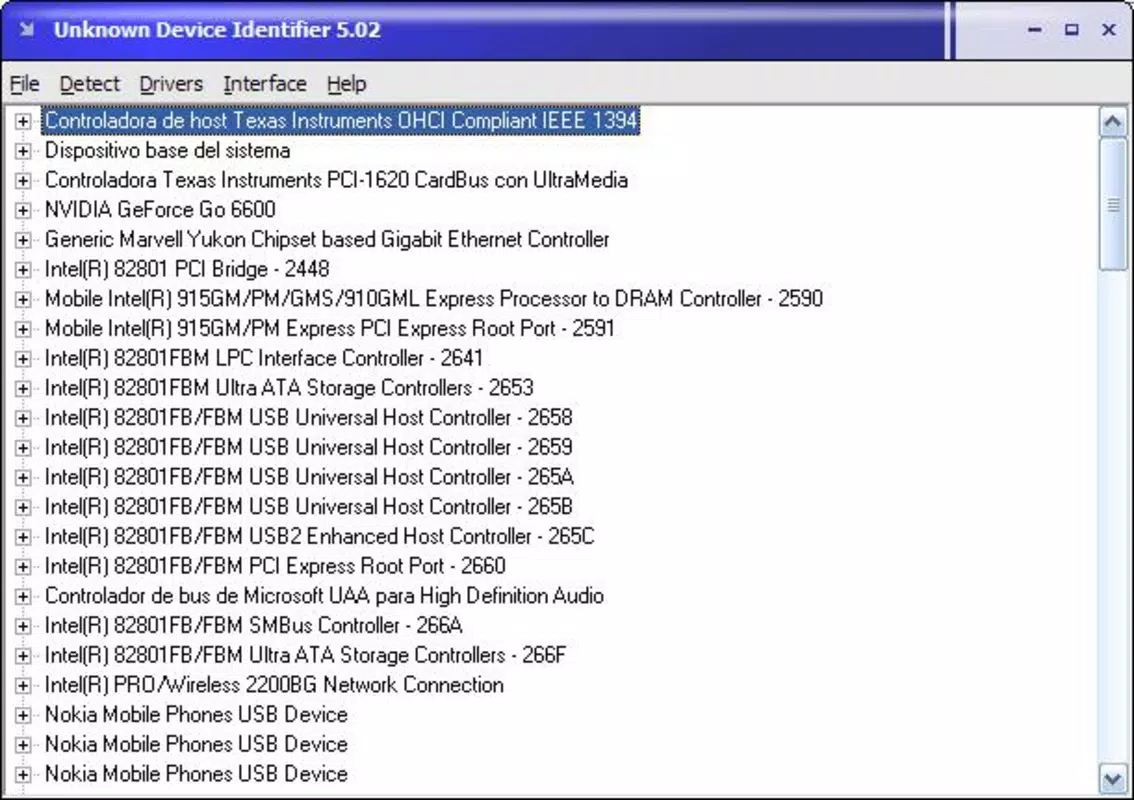
- User-Friendly Interface: The application features a clean, intuitive layout with minimal navigation steps. Users can initiate a scan and view results with just a few clicks, making it accessible to non-technical users.
- Quick Scanning Process: The app completes system scans rapidly, minimizing wait time. This efficiency is particularly beneficial when troubleshooting urgent hardware issues.
- Free to Use: The tool is available at no cost, removing financial barriers for users seeking a reliable driver identification solution.
For example, a user installing a new sound card may see a yellow exclamation mark in Device Manager. By running Unknown Device Identifier, they can instantly identify the device model and proceed to download the correct driver. Similarly, a technician supporting multiple systems can use the tool to quickly diagnose and resolve recurring hardware recognition issues across different machines.
Интерфейс, UX и производительность
The interface of Unknown Device Identifier is designed with simplicity and functionality in mind. It presents scan results in a structured, easy-to-read format, with categorized device listings and clear labels. Navigation is straightforward, relying on a single main window with minimal distractions. The layout prioritizes essential information, such as device name and ID, ensuring users can quickly interpret results without confusion.
Although the developer did not list formal performance metrics, the app’s small file size of 2.1 MB suggests optimized resource usage. It is expected to run efficiently on a wide range of Windows systems, including older hardware. Responsiveness is consistent during scanning, with no reported lag or crashes in available documentation. Stability appears reliable, especially given its long-standing presence since 2015. The application does not require background processes or constant system monitoring, reducing interference with other tasks.
Совместимость платформы и технические требования
Unknown Device Identifier is designed for the Windows platform and is compatible with various versions of the operating system. The specific OS requirements were not listed by the developer. However, given its release date in 2015 and minimal file size, it is likely to function on Windows 7 and later versions. The application has a file size of 2.1 MB, which makes it suitable for devices with limited storage capacity. No additional dependencies or runtime environments are known to be required for operation.
Compatibility information was not fully disclosed. Users should ensure their system meets standard Windows requirements for running utility applications. The developer did not specify whether the app supports 64-bit or 32-bit architectures. It is recommended to test the tool in a controlled environment before deployment in critical systems.
Плюсы и минусы
Плюсы
- Free to use, making it accessible for all users.
- Lightweight with a small file size of 2.1 MB.
- Quick scanning process reduces troubleshooting time.
- Intuitive interface suitable for non-technical users.
- Provides detailed device identification for accurate driver selection.
Минусы
- Developer did not provide specific OS compatibility details.
- No information on support for 64-bit or 32-bit systems.
- Version 1.0 has not been updated since 2015, raising concerns about modern hardware compatibility.
- Limited documentation or user guides available.
- Does not include automatic driver installation—users must download manually.
Часто задаваемые вопросы
Безопасно ли скачивать и устанавливать Unknown Device Identifier?
Yes, the app is free and has been available since 2015. It does not contain known malware or intrusive behaviors. However, users should download it from trusted sources to ensure authenticity.
Можно ли использовать Unknown Device Identifier на Windows 10 или Windows 11?
While the developer did not specify compatibility with newer Windows versions, the app’s lightweight design suggests it may function on Windows 10 and 11. Testing on a non-critical system is advised.
Устанавливает ли приложение драйверы автоматически?
No. The tool identifies unknown devices and provides information to help locate the correct driver. Users must manually download and install the driver from the manufacturer’s website.
Существует ли мобильная версия Unknown Device Identifier?
There is no indication that a mobile version exists. The app is designed exclusively for Windows desktop and laptop systems.
Как часто следует обновлять Unknown Device Identifier?
As of version 1.0, no updates have been released since 2015. Users should exercise caution when relying on older tools for modern hardware and consider alternative solutions if compatibility issues arise.
Заключительные мысли
Unknown Device Identifier remains a functional tool for users facing unrecognized hardware on Windows systems. Its core strengths—lightweight design, quick scanning, and free access—make it a valuable asset for basic troubleshooting. While its age and lack of updates may limit effectiveness with newer devices, it still serves as a reliable fallback for legacy hardware and simple diagnostic needs.
The app is particularly beneficial for home users and small office technicians who require a no-cost solution to resolve device recognition errors. For those seeking a secure, straightforward way to identify unknown devices and begin the driver search process, this utility delivers on its promise. Despite its limitations, it holds relevance in the system utility space as a simple yet effective tool.
Download Unknown Device Identifier now


